

I’ve spent over two decades in the trenches of user experience design. I remember the transition from table-based layouts to CSS, the pivot to responsive design when the iPhone launched, and the rise of the “attention economy.” But as we navigate 2026, the industry is facing its most significant shift yet. We are moving past the era of “design at any cost” into the era of Sustainable UX.
It’s not something most designers think about, including myself, until I was prompted by hearing about this as a concept. For years, we have treated the internet as an ethereal, weightless cloud. We have assumed that digital products were “green” simply because they weren’t printed on paper. I used to think that too, and before the concept of climate change emerged, it was more about saving trees.
We were wrong. The cloud is a physical infrastructure, a sprawling network of data centres, undersea cables, and cooling systems that hum 24⁄7. While AI-focused data centers match the power consumption of massive aluminum smelters, their high geographic density creates an even more intense and localised environmental strain.
As UX designers, we are the architects of this energy consumption. Every high-resolution hero image, every auto-playing background video, and every complex JavaScript animation we approve is a direct instruction to a processor to consume power. If we want to build a future that lasts, we must stop designing for “wow” and start designing for efficiency.
Dark Mode
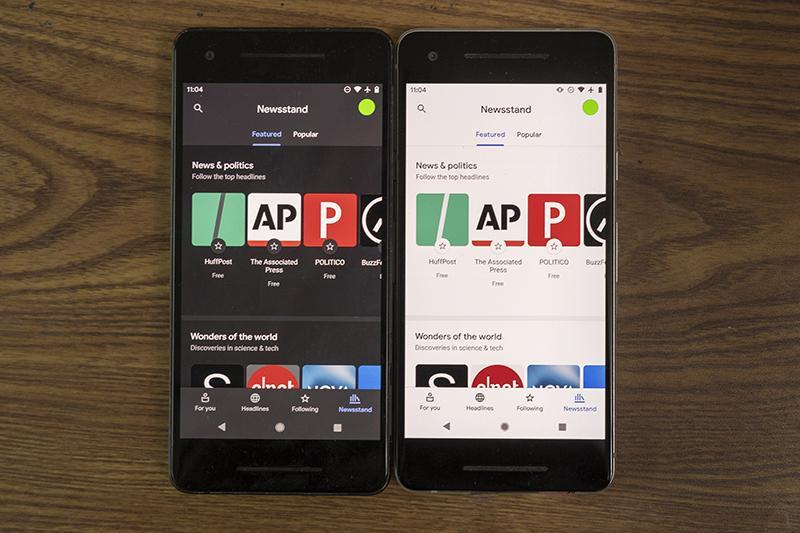
In the early 2000s, white backgrounds were the standard because they mimicked the familiarity of paper. However, the hardware has evolved, and our design philosophy must follow. The shift from LCD to OLED (Organic Light Emitting Diode) technology has fundamentally changed how colour impacts energy.
The Logic
Unlike traditional LCD screens, which require a backlight that is always on (even when displaying black), OLED screens illuminate each pixel individually. When a pixel is set to true black (#000000), that specific diode is turned completely off. It draws zero power.
The Data
The energy savings are far from negligible. A landmark study by Purdue University in 2021, which has become the gold standard for this discussion, revealed that at 100% brightness, switching from light mode to dark mode can save an average of 39% to 47% of battery power. On a global scale, if every major app defaulted to dark mode, the reduction in grid demand would be astronomical.
The Design Goal
In 2026, Dark Mode should no longer be a secondary “theme” tucked away in a settings menu. We should be designing with a “Dark-First” mentality. This doesn’t mean every site must look like The Matrix, but it does mean prioritising high-contrast dark themes as the default system-preferred state. This extends the hardware lifespan of the device and lowers the carbon footprint of every interaction.
I personally prefer Light-Mode for reading, so it makes sense to have both light and dark mode options available. There are also accessibility considerations with providing both options.
Image And Video Optimisation
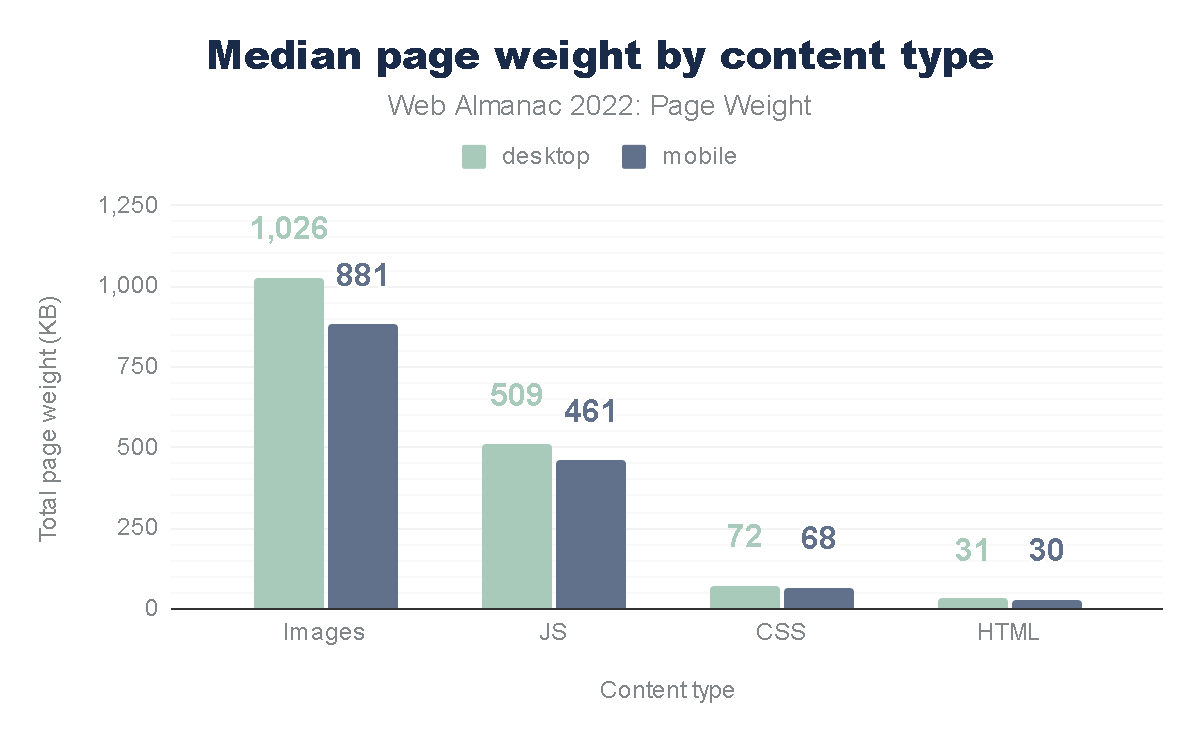
We have become lazy designers. With high-speed 5G and fibre optics, we’ve stopped worrying about file sizes. The average mobile page weight has increased by over 500% in the last decade, largely due to unoptimized visual assets.
The Logic
The “Digital Fat” of a website (those 4MB Unsplash photos and 15MB background videos) is the single largest contributor to page-load energy. Every megabyte transferred from a server to a client requires electricity for the transmission, the server’s processing, and the user’s rendering engine. When we use massive files, we are essentially “burning” energy to show a picture that could have been just as effective at a fraction of the size. Not to mention, you are also providing a better user experience with a page that loads much faster.
The Data
According to the HTTP Archive, images and video consistently account for the lion’s share of a page’s total weight. However, the shift to modern formats like AVIF and WebP can reduce image weight by up to 50% compared to JPEG, without any perceptible loss in quality.
Although these formats are not as familiar to me as JPG and PNG, I am definitely looking forward to using them to reduce page size.
The Design Goal
I recently led a redesign for a cybersecurity platform. By implementing a “Before and After” audit, we discovered that their homepage was loading 5.5MB of data. By replacing high-res photography with SVG (Scalable Vector Graphics) art and using clever CSS gradients instead of image assets, we dropped the load to 1.2MB. That is a 78% reduction in energy load! As a designer, your first question should always be:
“Do I need a photo for this, or can I achieve the same emotional resonance with code?”
Intentional Motion: Cutting “Loud” Animations
We live in an era of “scroll-jacking” and complex 3D Parallax effects. While these might win awards on Awwwards.com, they are often ecological disasters.
The Logic
Animation is not free. To render a complex animation, the device’s GPU (Graphics Processing Unit) must work at high capacity. This increases the CPU temperature, triggers cooling fans (in laptops), and drains battery rapidly. “Loud” animations that run constantly in the background or trigger massive re-paints of the browser are the energy equivalent of leaving your car idling in the driveway.
The Data
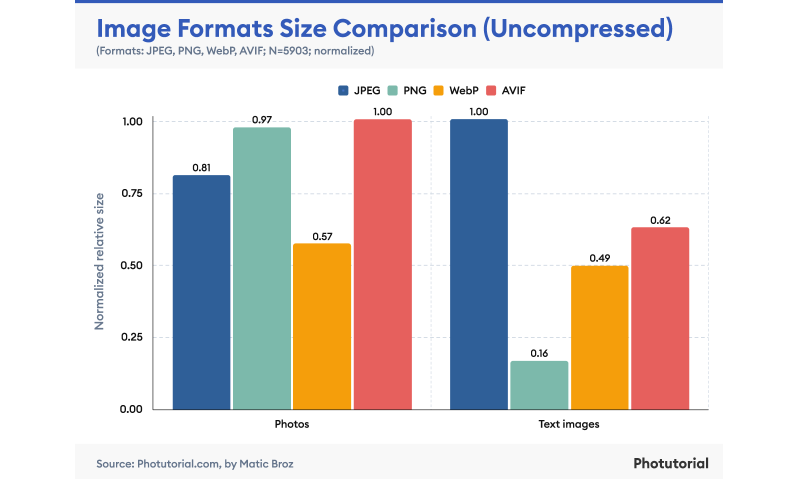
Google’s Material Design guidelines emphasize “Meaningful Motion.” They argue that animation should be used only to orient the user or provide feedback. And using WebP instead of JPEG can save 25-50% of data on a page.
The Design Goal
We must adopt Meaningful Motion. If an animation doesn’t help a user complete a task or understand a hierarchy, it is a waste. We should favour CSS transitions over heavy JavaScript libraries like GSAP or Lottie where possible, as CSS is hardware-accelerated and far more efficient for the browser to calculate.
As a UX designer, I can’t argue this approach. This not only helps reduce data waste but also improves UX for our users.
Setting A “Data Budget” For Every Project
In my 20+ years of UX, the most successful projects have generally been the ones with the tightest constraints.
Just as a project has a financial budget, it should also have a carbon and data budget.
The Logic
A Data Budget is a hard cap on the total size of a page (e.g., “This landing page cannot exceed 1MB”). This forces the design team to make difficult, intentional choices. If you want to add a new tracking script or a fancy font weight, you have to “pay” for it by optimising or removing something else. This prevents “feature creep” from turning into “carbon creep.”
The Data
The Sustainable Web Design model, developed by pioneers like Wholegrain Digital, provides a formula to calculate the CO2 per page view. The average website produces about 0.5 grams of CO2 per view. For a site with 1 million monthly views, that’s 6 metric tons of CO2 a year, equivalent to driving a car 15,000 miles.
The Design Goal
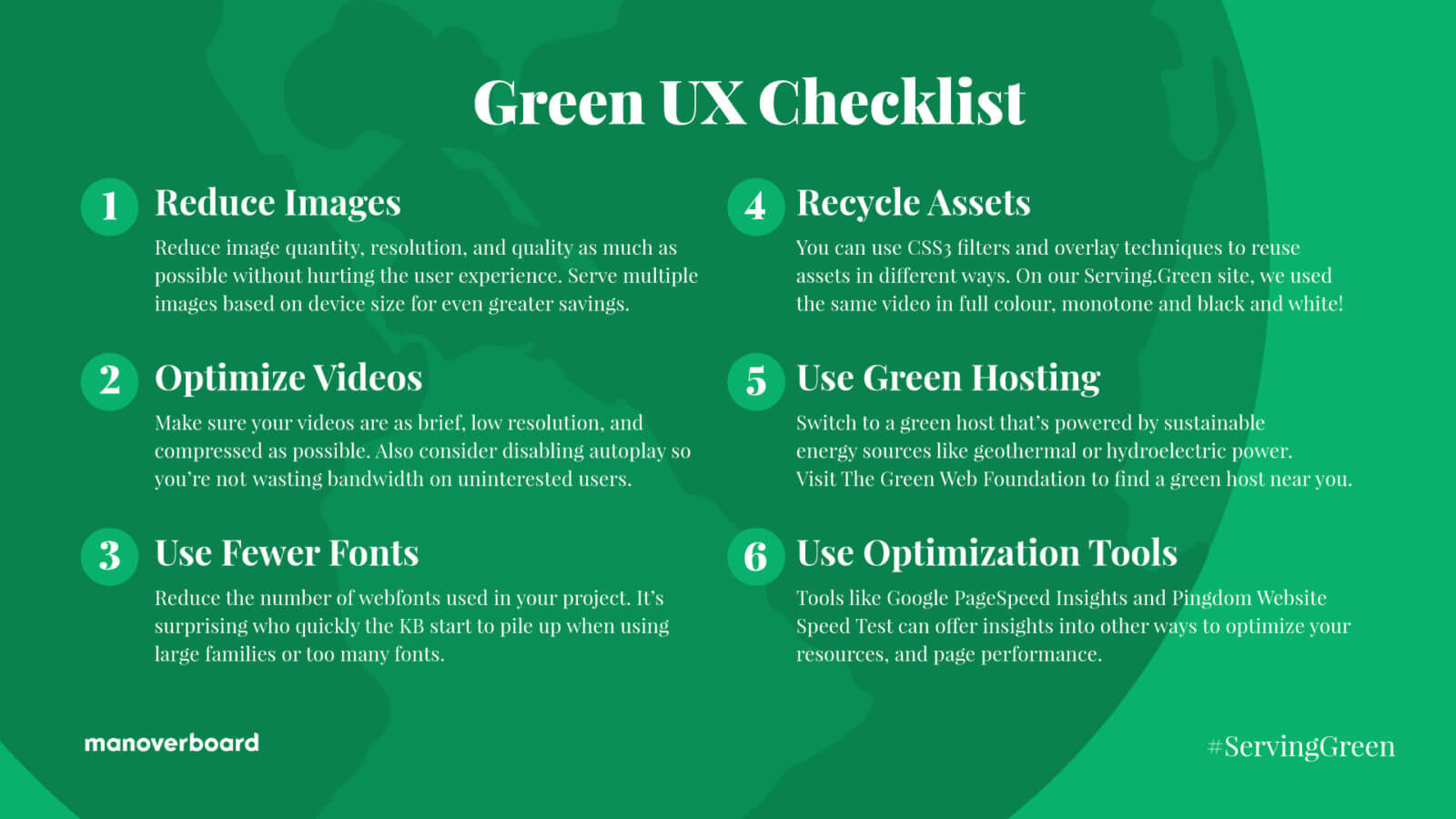
- Reduce Images
Question the necessity of every visual and use the smallest resolution and most efficient file formats (like AVIF) to minimize data transfer. - Optimise Video
Eliminate auto-playing media and prioritise highly compressed, short loops to ensure energy is only spent on content the user intends to view. - Limit Fonts
Use a maximum of two web font weights or stick to classic system fonts to remove unnecessary server requests and rendering bloat. - Recycle Assets
Repurpose a single image or video multiple times using CSS filters and overlays to create visual variety without increasing the total page weight. - Choose Green Hosting
Host your digital products on servers verified by The Green Web Foundation to ensure they are powered by renewable energy sources. - Minimize Data Distance
Select server locations geographically close to your primary audience to reduce the energy required for data to travel through physical infrastructure.
The Business Case For Eco-friendly Design
Some might argue that “Green UX” sounds like a compromise on quality. On the contrary, it is a competitive advantage. Sustainable design is performance design.
When you reduce page weight, your site loads faster. When your site loads faster, your Core Web Vitals improve. When your Core Web Vitals improve, your SEO ranking goes up. Furthermore, users on older devices or slower data plans (especially in emerging markets) can actually access your product. This is the definition of “Inclusive Design.”
By cutting the “digital fat,” we create a leaner, faster, and more accessible web. We are moving away from the “disposable design” of the 2010s toward a more permanent, respectful digital architecture.
Conclusion: The Future Of “Clean” Design
In my two decades of design, I’ve seen many trends come and go. Skeuomorphism, Flat Design, Neumorphism — they were all aesthetic choices. But sustainable UX isn’t a trend; it’s now a necessity. We are the first generation of designers who have to reckon with the physical consequences of our digital work.
Sustainable UX is a “win-win-win.” It’s better for the planet because it reduces energy consumption. It’s better for the user because it results in faster, more responsive interfaces. And it’s better for the business because it lowers hosting costs AND improves conversion rates.
The era of “unlimited pixels” is over. In 2026, the most sophisticated design is the one that leaves the smallest footprint. We are no longer just designers; we are the guardians of the user’s battery, their data plan, and ultimately, the environment.
The Call To Action
I challenge you to audit just one page of your current project today. Use a tool like the Website Carbon Calculator to see its impact. Then, look for the “invisible waste.” Can that image be an SVG? Can that video be a static hero? Can that “loud” animation be silenced?
Start small. The most elegant solution is often the one with the fewest bytes.

(yk)