


This article was co-written with Arely Estephany Flores and Gabriela García.
Small and medium-sized enterprises (SMEs) are critical to economic growth, yet lending to them remains one of the most operationally complex processes for financial institutions. Credit decisions often depend on unstructured documents, multiple external data sources, and strict regulatory requirements — all under pressure to deliver faster outcomes.
In this post, we explore how Agentic AI, operationalized on SAS Viya, can modernize SME loan origination by combining automation, advanced analytics, and explainable AI. We outline a practical project blueprint for accelerating credit decisions—designed for both business leaders and technical practitioners who want to understand and build how this type of project can be designed and implemented end to end.
The Business Challenge: SME Lending Is Still Too Slow
Traditional SME loan origination typically relies on manual extraction of financial data from PDF documents, the use of disconnected systems for credit risk, business rules, and external data sources, and long review cycles involving analysts and credit committees. These processes often lack consistent explainability for regulators and executives, making it difficult to scale decisions efficiently. Even when advanced analytical models are available, many organizations struggle to operationalize analytics consistently across the full credit lifecycle. The result? – Slow decisions, higher operational costs, and inconsistent outcomes.
Imagine a lending process where financial data is automatically extracted, loan applications are enriched with external data sources, and governed credit strategies are executed in real time. In this model, every decision is accompanied by natural language explanations tailored to different audiences—analysts, executives, and regulators—without compromising transparency or control.
The question becomes: How can we accelerate SME credit decisions while maintaining governance, transparency, and trust? This is the type of solution financial institutions can design with SAS Agentic AI Accelerator to accelerate SME lending while maintaining governance and trust.
The Solution: Agentic AI on SAS Viya
This solution leverages Agentic AI — a modular approach where multiple AI agents collaborate across a workflow — all leveraged with SAS Agentic AI Accelerator and governed by SAS Viya.
Instead of relying on a single AI model, Agentic AI coordinates multiple specialized components across the workflow. These components work together to extract and structure data, enrich applications with external sources, execute governed decision strategies, and generate natural‑language insights. The result is a credit decisioning process that is scalable, explainable, and fully auditable.
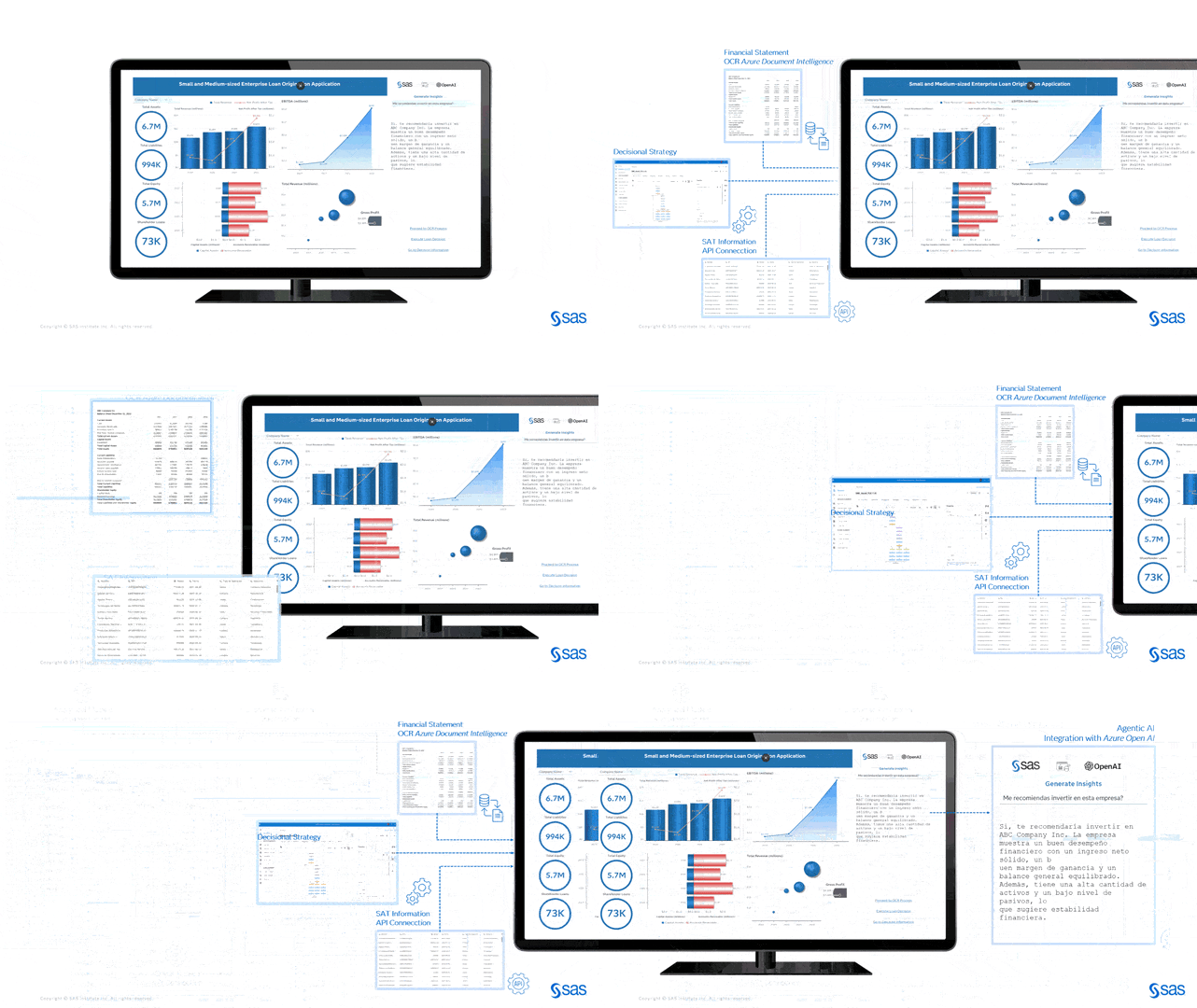
End-to-End Solution Overview
At an elevated level, the SME lending flow works as follows:
- A loan application is initiated from a front-end interface.
- Financial documents are processed using an OCR process.
- External data sources are retrieved via APIs.
- Decisional strategy executes rules, scorecards, and strategies.
- An Agentic AI workflow triggers an LLM to generate business insights.
- Results are presented in an interactive dashboard.
Each step is governed, versioned, and fully traceable on SAS Viya.
What do you need to Build This Use Case on SAS Viya?
To recreate this case, you will need:
1. SAS Viya
SAS Viya is a powerful platform for modern data analysis that helps companies to make data-driven decisions more efficiently and securely. Its flexible architecture, integration of AI, and extensive functions make it future-proof and suitable for many industries.
2. Access to an LLM
You can use whichever LLM you’d like such as GPT, Claude, Gemini, Llama, or Azure OpenAI, but it is essential to have an active subscription. We will access the LLM via API and integrate it with SAS through Python code; for this, we will need the Endpoint and the API key of the LLM. This video breaks it down clearly:
3. Agentic AI Accelerator
The SAS Agentic AI Accelerator provides a method for building AI agents leveraging SAS Viya technology. It is designed to help users move more quickly from use-case ideas to production, utilizing No/Low/Yes Code interfaces and full governance to build agents that balance autonomy and trust. It includes:
- The full code + documentation to deploy in your SAS Viya Environment
- All the integrations that are built (SAS Studio Custom Steps, a no code prompt engineering UI, SAS Intelligent Decisioning Node, SAS Macros, Postman Collection and so much more)
- Pre-build deployment recipes for LLMs
- Pre-build deployment recipes for embedding models
- An accelerator that builds only on SAS Viya standard components and does not use any unsupported APIs or otherwise undocumented features
Read Introducing the SAS Agentic AI Accelerator: Build AI Agents Seamlessly in SAS Viya for more details.
4. OCR Process
For the OCR process, you can use any tool you have access to, for example:
- SAS Document Analysis: provides an intuitive and easy-to-use set of utilities for deploying end-to-end cloud-based OCR processing pipelines and optimizes these pipelines for handling large volumes of data. It further structures outputs in a manner which seamlessly integrates with existing data science workflows and structured SAS datasets. Check out the SAS Help Centre: SAS Document Analysis: User’s Guide.
- ABBYY FineReader PDF: Renowned for exceptional accuracy in handling complex layouts and 198+ languages. Ideal for legal and professional document comparison.
- Adobe Acrobat Pro: An all-inclusive suite for editing, signing, and converting scanned documents into searchable, editable PDFs.
- Google Document AI / Cloud Vision API: A scalable, cloud-based solution perfect for developers requiring advanced image analysis and structured data extraction.
- Amazon Textract: Specifically designed to extract structured data (tables, forms) from documents efficiently.
5. Python
Python should be integrated into your SAS Viya environment. Review its functionality and the required libraries. The following list includes some generic libraries that must be installed:
- os: This library is used for interacting with the operating system.
- json:This library is used for working with JSON data.
- dotenv: This library is used for loading environment variables from a .env file.
- swat: This library is used for interacting with SAS Viya.
- io: This library is used for handling input and output operations.
- copy: This library is used for copying objects.
- parse: This library is used for parsing URLs.
- pandas: This library is used for data manipulation and analysis.
- OpenAI:This library is used for interacting with OpenAI services.
IMPORTANT: The libraries required will depend on the LLM code that needs to be incorporated for your selected LLM provider.
Key SAS Viya Components
1. Access to external services
To incorporate the OCR Process, we need to perform a SAS Job Execution in SAS Studio, where we will invoke the OCR service using the Endpoint and the Key. This step is essential for the correct integration and operation of external services with SAS.
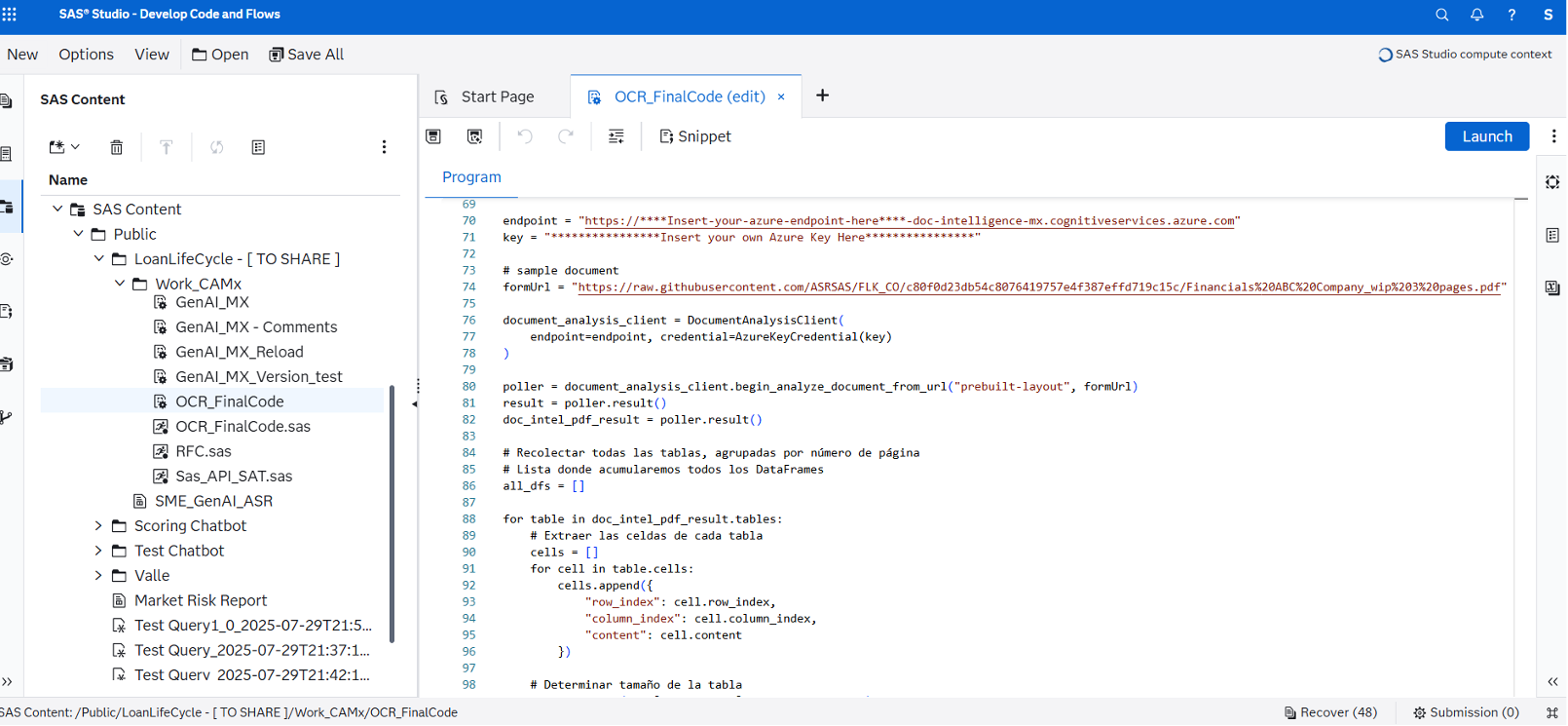
2. Orchestrating the Credit Strategy
SAS Intelligent Decisioning serves as the core decision engine, you can build your credit strategy in a user-friendly, testable, and governed application. Some functionalities you can integrate into the SME loan origination decision flow are:
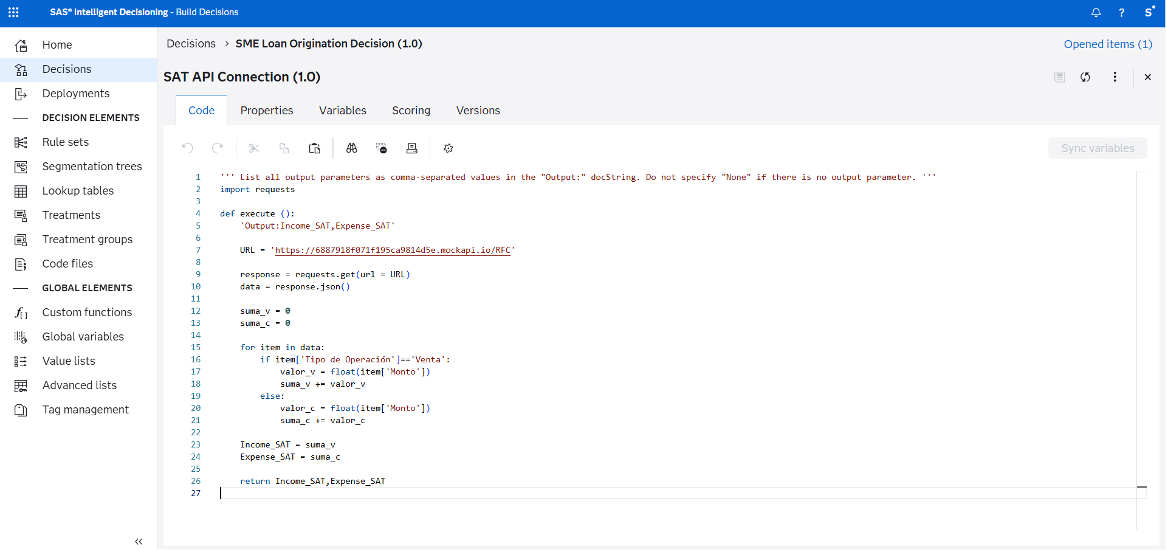
- Custom Code Files: You can define custom code files to do things that are not possible in rules, models, or treatments. For example, it allows you to extract the applicant information from databases after the credit application process and after performing the OCR on the financial statements. Also, you can establish REST API connections to external data sources, like the credit bureau to retrieve the applicant’s historical credit behaviour.
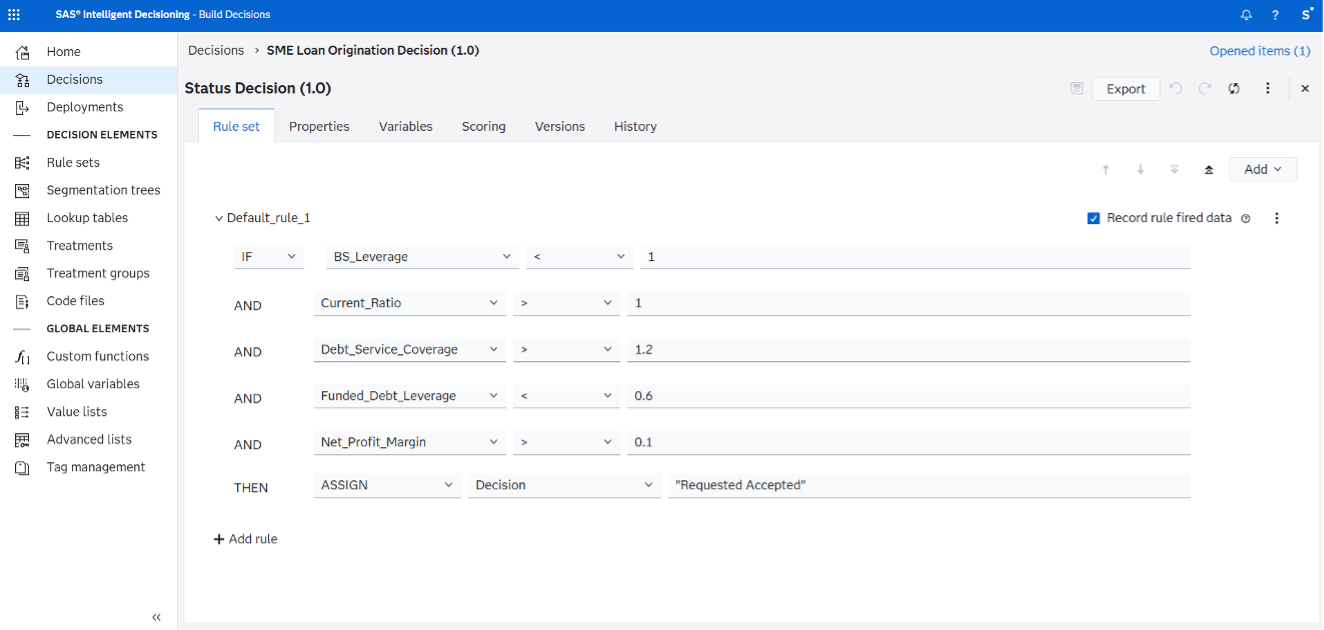
- Business Rule Sets: A rule specifies conditions to be evaluated, and it can also specify actions to be taken if those conditions are satisfied. Rule sets are logical collections of rules that are grouped together because of interactions or dependencies between the rules. This object can be used to calculate different ratios from the applicant’s financial statement information, such as Net Profit Margin, Current Ratio, Sales Increase Year Over Year, etc. Also, it may help to assign the probability of default based on the outputs of previous nodes, calculate the loan’s interest rate, and determine whether the loan application was approved based on the calculated financial coefficients.
- Models: You can integrate analytical models developed in SAS, Python, and other programming sources into the decision flows. For instance, a scorecard built in SAS Model Studio can be used to calculate the score points to determine the applicant’s probability of default.
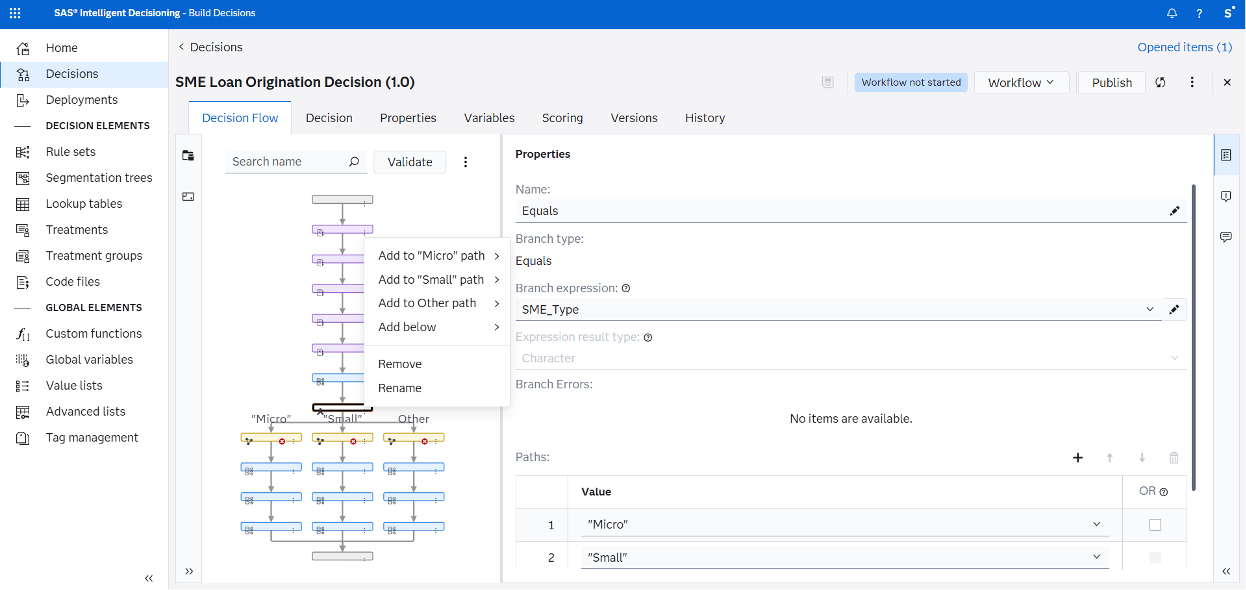
- Branches: Branches enable you to add conditional logic to a decision. Depending on the branch type, a branch can have multiple outgoing paths. Branches can segment applicants by company size, i.e. Micro, Small, and Medium.
- Champion/challenger strategies. You can use an A/B test to direct input records into a champion path or a challenger path for testing. Each path includes one or more objects such as rule sets, treatment groups, models, or other objects.
- Real-time decision execution. You can deploy your decision flows at the edge or in stream by integrating with IoT devices and real-time systems. The decision flow for the use case reviewed in this article has the potential to be integrated into a front end via a REST API, allowing the end users to execute it on demand.
There is huge value that risk and business teams can obtain by incorporating SAS Intelligent Decisioning into their credit loan process. Some benefits include ensuring consistent, explainable, and auditable decisions; reducing operational risk by centralizing rules and models; and supporting regulatory compliance through transparency and documentation.

3. One Dashboard for Everyone:
The front end of the solution is a SAS Visual Analytics dashboard, designed for credit analysts and decision makers. It brings together financial data, automated decisioning, and generative AI insights into a single, intuitive interface.
Rather than treating analytics, decision execution, and AI explanations as separate steps, this dashboard allows users to analyze, act, and understand outcomes in one place.
Key Dashboard Capabilities
The Visual Analytics dashboard can include:
- Financial KPIs and trends
Key financial indicators derived from OCR‑extracted documents, external data sources, and calculated ratios can be presented through charts and tables. - Interactive charts and filters
Analysts can filter results by company, loan application, or financial attributes to explore the data driving each decision. - Buttons that trigger backend processes
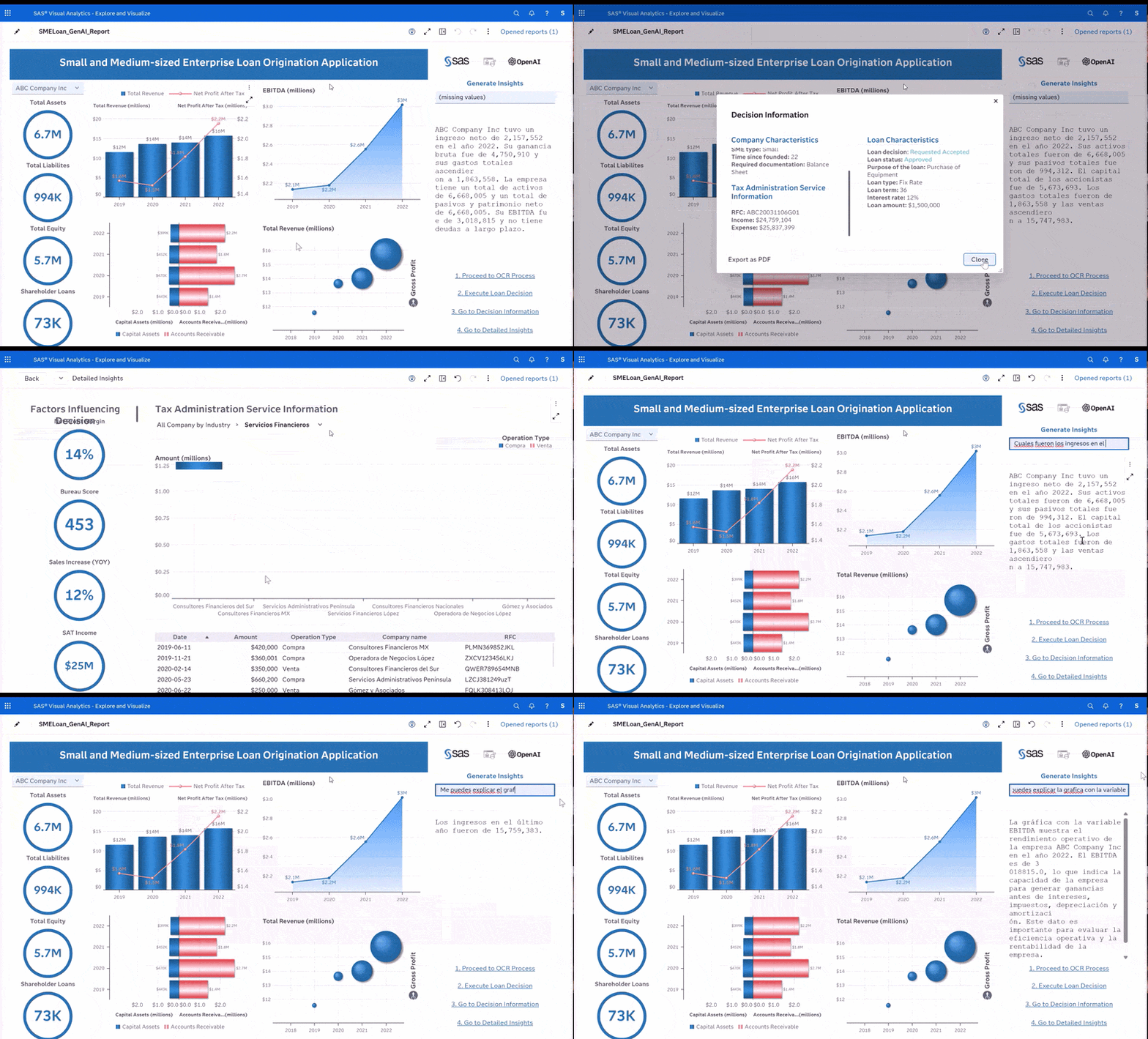
The dashboard can use text and button objects configured as actions to trigger SAS jobs for:- Proceed to OCR Process
Triggers OCR execution to extract financial data from uploaded documents. - Execute Loan Decision
Executes the SME loan origination decision flow in SAS Intelligent Decisioning - Generate Insights
Calls a Large Language Model (LLM) to generate natural‑language explanations.
- Proceed to OCR Process
- Embedded LLM responses inside the dashboard
AI‑generated insights can be displayed directly in the dashboard, eliminating the need to switch tools or applications.
This pattern is based on SAS Job Execution, allowing SAS code to be executed directly from a web interface.
This creates a seamless user experience where analytics, decisions, and explanations live in one place, you can inspire in the following example to design yours:
Generative AI: Turning Analytics into Insights
To make analytical outputs accessible and actionable for business users, the solution integrates a large language model (LLM) directly into the SME lending workflow. Rather than exposing users to raw scores or technical metrics, the LLM transforms structured analytical results into clear, natural‑language insights. It summarizes credit decisions, explains key risk drivers and financial ratios, and provides contextual insights tailored for different audiences, including analysts, executives, and customer‑facing teams. Importantly, the LLM operates under SAS Viya governance, ensuring that it does not replace analytical models or business rules, but instead explains their outputs in a transparent and controlled manner. This approach bridges the gap between advanced analytics and business understanding, improving decision confidence while maintaining trust.
How to create a LLM Insight Generation dashboard in Visual Analytics?
To build the generative AI interaction shown in this proposed use case, users need a small set of Visual Analytics objects and backend components.
1. Data-Driven Content Object for Insight Generation
To show the LLM response displayed in the dashboard you need to use a data‑driven object that embeds a Web Content object within SAS Visual Analytics. This Web Content object renders the response returned by a SAS Studio job and refreshes dynamically each time the job is executed. As a result, the LLM output behaves like a native dashboard component, seamlessly updating as new insights are generated. This approach allows generative AI responses to be fully integrated into the analytics experience, without requiring users to switch tools or interfaces.
2. SAS Studio Job to Call the LLM
A SAS Studio job is responsible for generating the natural‑language insights displayed in the dashboard. The job receives the analyst’s question as an input parameter, collects the structured outputs produced by the credit decision flow—such as risk scores, financial ratios, and approval status—and then invokes the selected LLM through its API. Once the response is generated, the job returns a natural‑language explanation to SAS Visual Analytics, where it is rendered in the Web Content object.
3. Text Object for User Questions
A Text object in the dashboard is used to capture the analyst’s question.
For example:
This text value is passed directly to the SAS job and used as part of the LLM prompt, keeping the interaction simple and intuitive for business users.
4. Button or Action Object to Trigger Insight Generation
You can also add a “button” with a text object and configure it as an action used to execute the LLM job.
When the user clicks “Generate Insights” the question from the text object is passed as a parameter and the SAS job is executed. Then, the LLM generates a response, and the Web Content object refreshes to display the answer.
This ensures insight generation is explicitly user‑driven, supporting human‑in‑the‑loop decisioning.
Business Value Delivered
This proposed design enables financial institutions to significantly accelerate SME credit decisions while reducing manual effort and operational risk. By centralizing analytics, decisioning, and generative AI within a governed platform, organizations can improve consistency and regulatory compliance, increase transparency for auditors and risk committees, and deliver clear, contextual explanations to business users. Most importantly, it demonstrates how generative AI can be operationalized responsibly—enhancing human decision‑making rather than replacing it—while maintaining trust, control, and explainability across the entire credit lifecycle.