


Introduction
Agents using Large Language Models (LLMs) are very powerful to extract insights from unstructured data. In this blog I describe how Agentic AI could help reduce attrition in an organization. This example is intended for technical practitioners who want to understand how to build such a use case in SAS Viya and for Human Resource professionals to understand how Agentic AI can be used to reduce attrition. The case shows how deterministic models on structured data and probabilistic models on unstructured data can be combined in one agentic flow.
The agentic workflow is designed to find the best training option out of a set of qualified training matching employees’ development goals provided as free text. I use the SAS Agentic AI Accelerator to easily try out different prompts with several available LLMs to see how to get the best results from the training descriptions. Next, this Open-Source Framework helps to register the best prompt design for SAS Model Manager, which is part of the SAS Viya platform. Finally, I created an agentic workflow in SAS Intelligent Decisioning also within SAS Viya. This tool gives full flexibility in designing agentic behavior within guardrails and according to organizational policies like HR guidelines. Overall, SAS Viya provides governance across prompts, large language models, and workflows, supporting safe and controlled AI deployment within a single platform.
The issue
Employee Attrition is a big concern in many organizations. Keeping the most valuable employees is challenging whereas attracting new hires is expensive, time-consuming, and uncertain as well. Offering customized development opportunities can help retain current employees. In many industries this is a growing issue, especially in Healthcare. Nurses and doctors are used to staying for a longer period at a hospital but due to high workloads, limited salary raises and potential job opportunities elsewhere they tend to leave the organization more easily. Additionally, growing concerns of population aging and fewer young people at nursing schools reinforce the issue. Providing optimal personalized development guidance with challenging training opportunities could help in retaining the best employees.
Our solution
In our solution, I use Healthcare data to let the agent give recommendations about which development option should be considered for nurses, doctors or other employees in a hospital depending on textual input from a questionnaire describing their development goals for the future. The questionnaire consists of three questions:
- Which work aspects of your current job give you energy?
- Which new capabilities would you like to develop in the next 12 months?
- How do you see your role evolve in 3 to 5 years?
Additionally, we asked if they have a specific training request.
The results have been collected in a dataset. We will provide a selected LLM this input to find the best training recommendation from a set of qualified training options. This process is steered by HR guidelines such that both employees’ performance ratings and attrition risk count for deciding whether an employee would be eligible for a full Development Path or just a single default or premium training.
To create the solution, we use SAS Viya to create all components first and then bring it together in an agentic workflow. This workflow will be used to show training advice for an individual employee on a SAS Visual Analytics dashboard. The steps are:
- Build a Machine Learning model to predict attrition
- Implement HR policies for personal development pathways
- Design prompts for development and training advice
- Implement the Development Path Agent
- Implement the Training Advisor Agent
- Bring it all together in an Agentic Workflow
- Operationalize the workflow and get advice
Implementation in SAS Viya
Everything in AI starts with data. For this use case we collected HR data of an organization and synthesized the dataset with SAS Data Maker, which is also within SAS Viya, we easily see the content of the dataset and evaluate the quality and completeness of the variables in it.
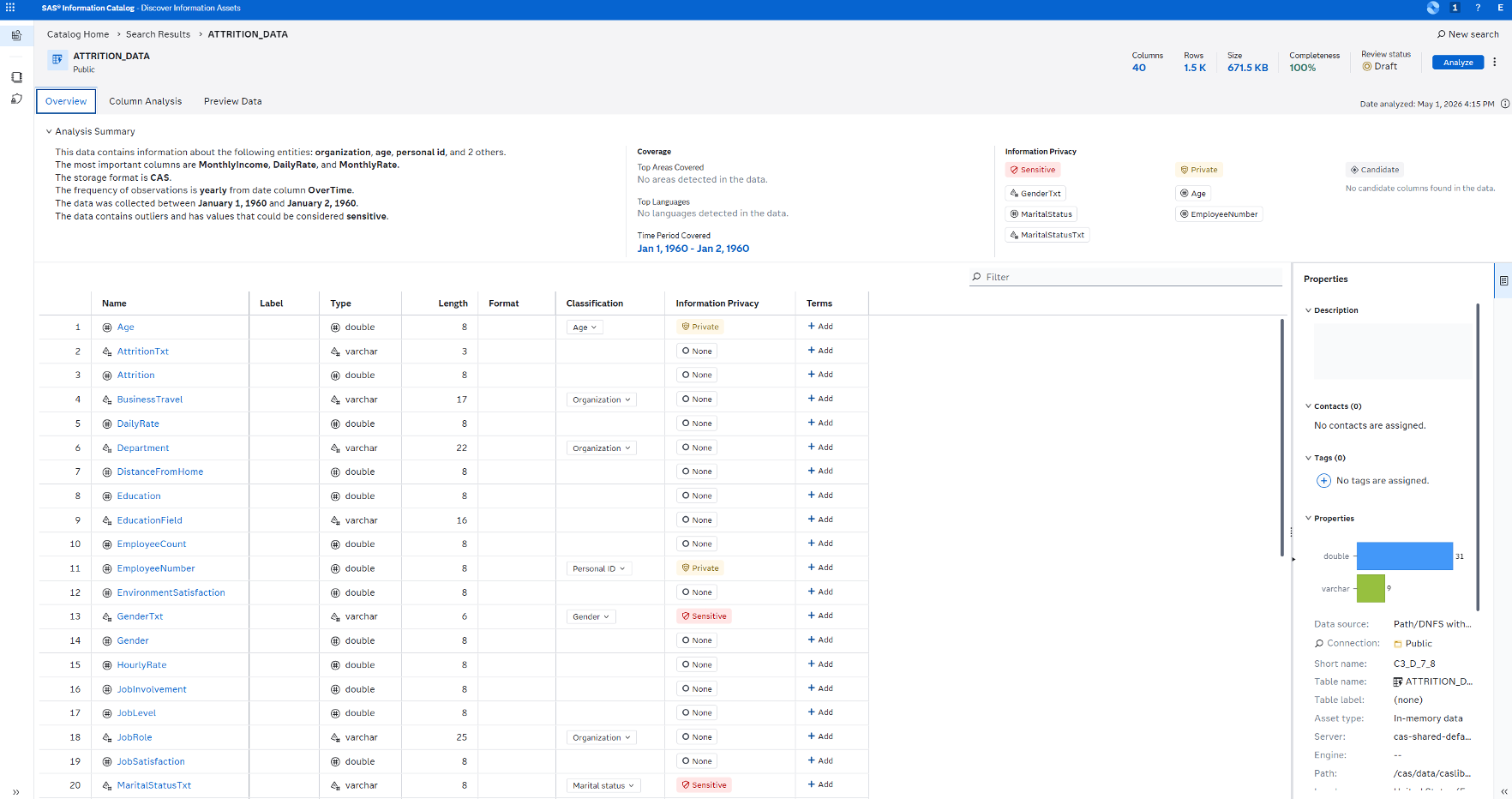
The data contains information about age, salary, education, job role, work experience and performance rating of each employee. In total we have 40 columns. For predicting attrition we use the variable AttritionTxt, a binary yes/no variable telling whether this employee has left the organization.
Let’s now start building our models and agentic workflows. I will explain each step mentioned above in more detail:
Step 1. Predicting Attrition using Machine Learning
For this I leverage the power of Model Studio, an intuitive user interface for model development. We can easily build model pipelines from scratch, use prebuilt templates or let SAS Viya do the job by using the “Automatically generate the pipeline” option.
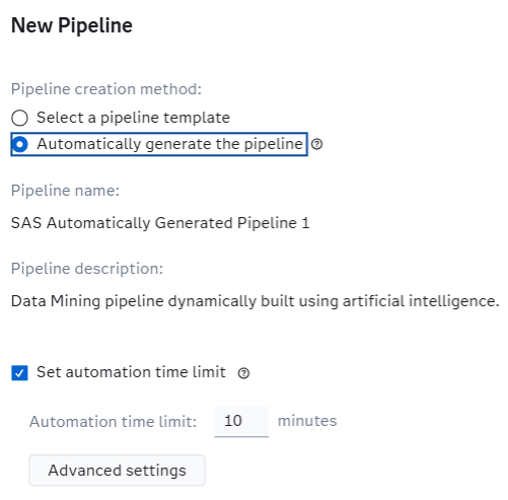
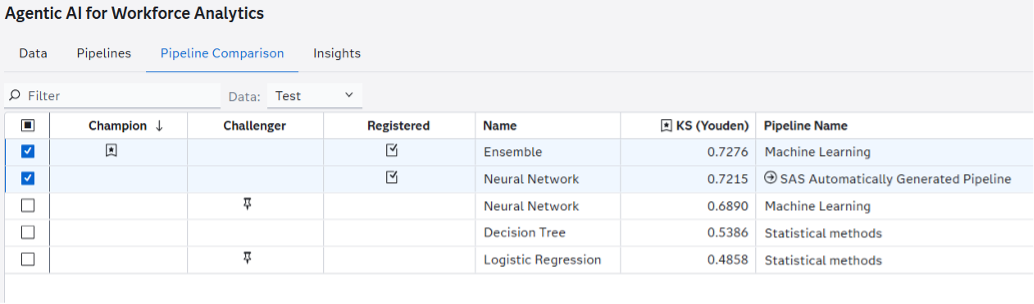
This feature analyzes the data and tries several approaches using sophisticated search and optimization techniques. After running for a couple of minutes SAS Viya finds 4 candidate pipelines of which the final “Neural Network (2)” pipeline performs best.
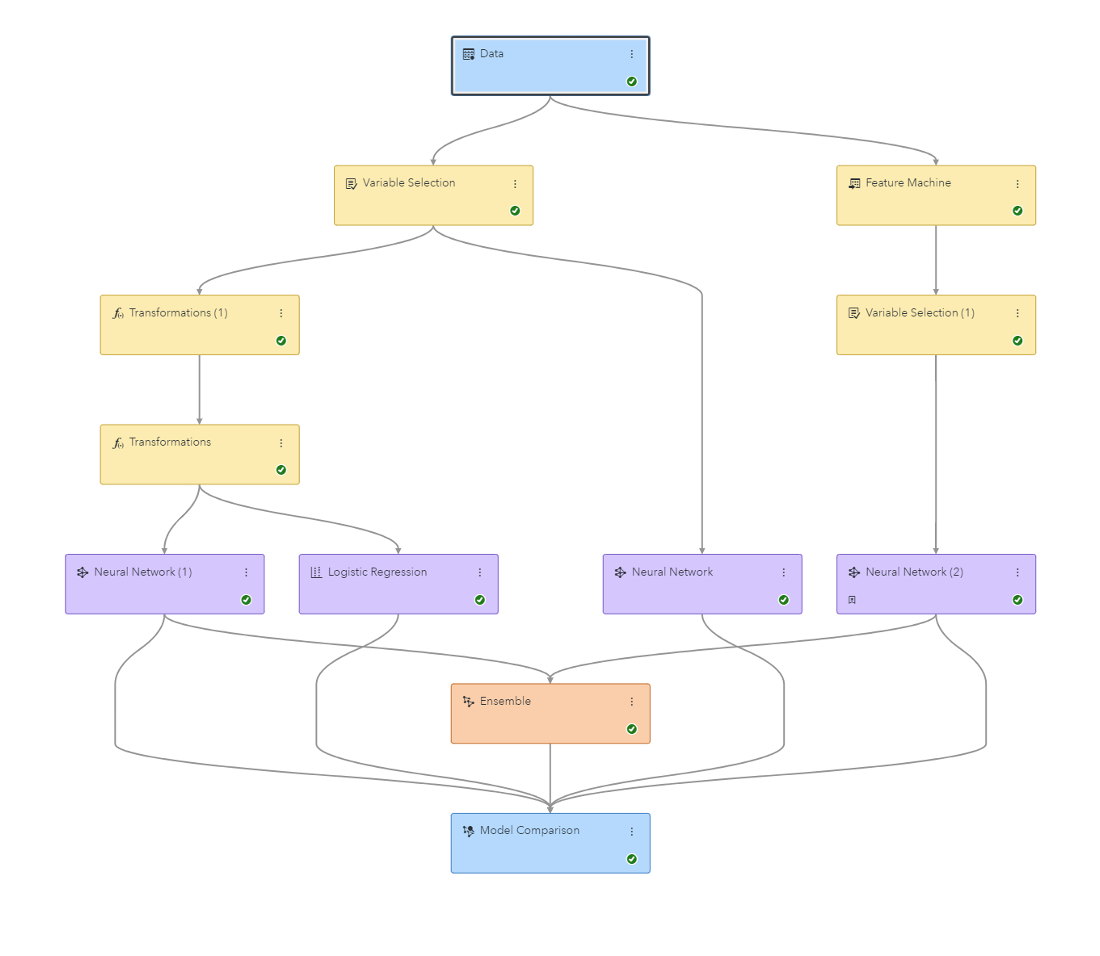
After testing other approaches, I found out that an ensemble model combining several model predictions together could even improve the results slightly, especially for certain age groups. It is nice to have several approaches together in a model tournament instead of just sticking to one favorite algorithm all the time. As a developer I like this very much.
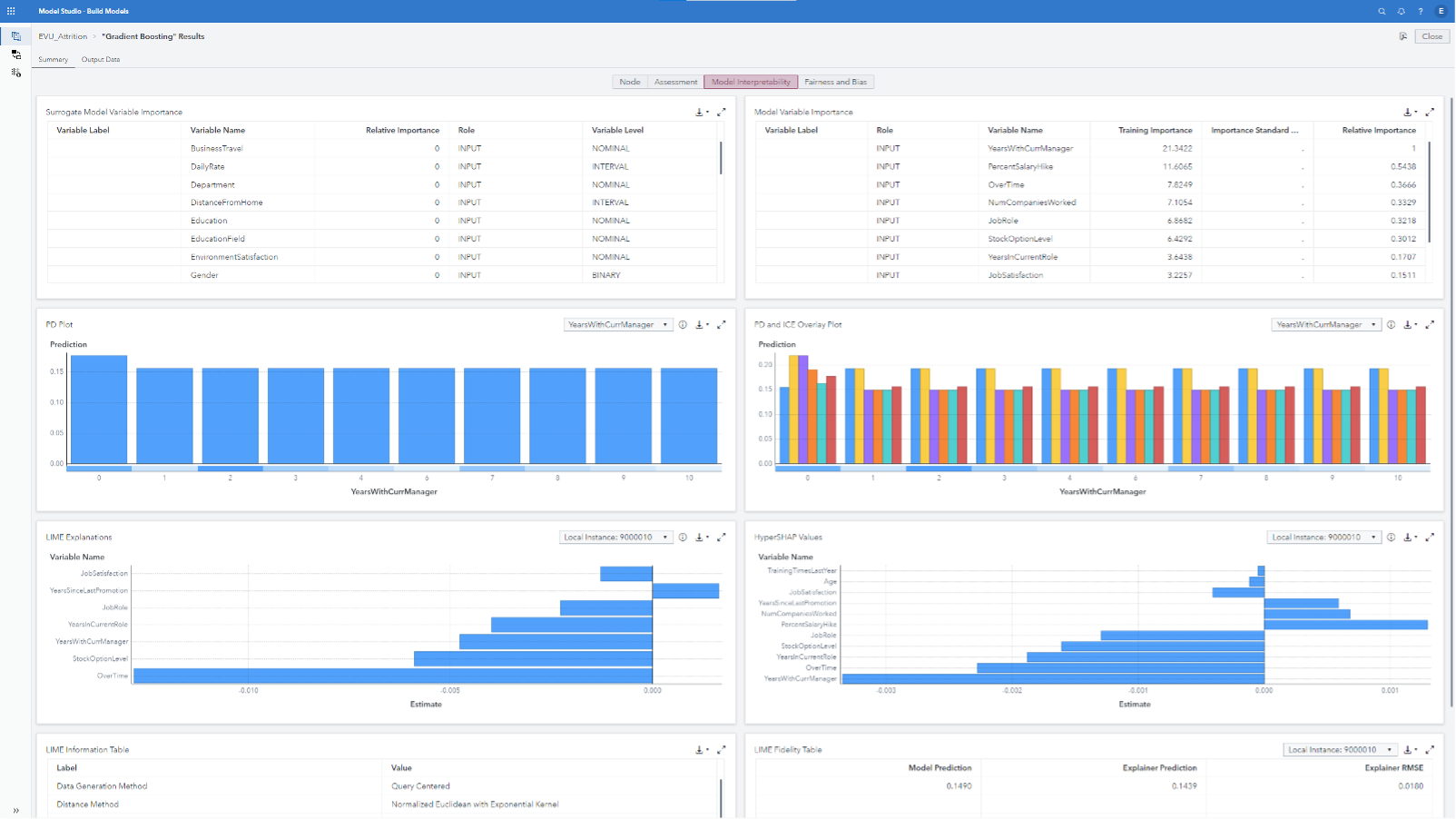
Because the models are difficult to interpret, I use out-of-the-box explainability results to understand the models better. This gives nice PD and ICE plots as well as LIME and HyperSHAP explanations. The values can be used to give insights into why the models predict attrition for an individual employee.
As a final check I tested the models for Bias and Fairness. I noticed some differences in Performance and Prediction results between group levels and used mitigation techniques to lower the bias.
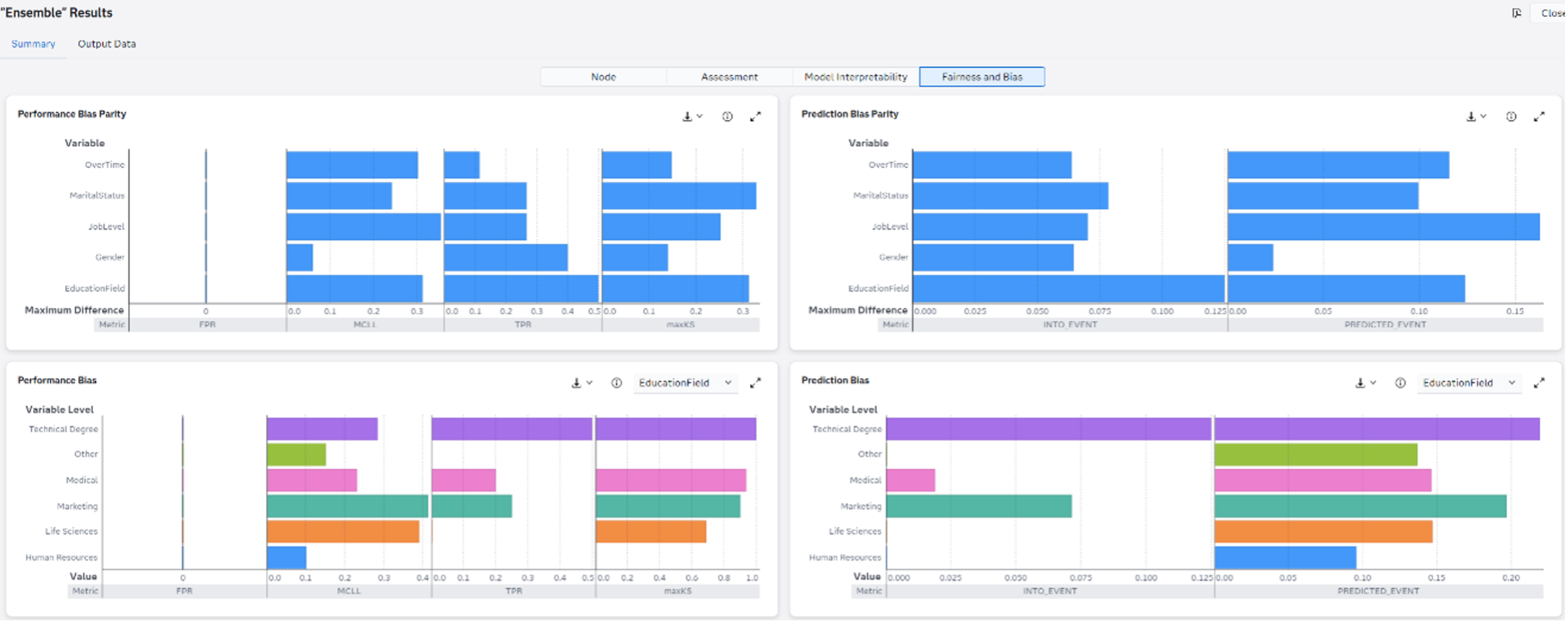
Both Explainability and Bias & Fairness results can be found in the Results output of a single model node. For Explainability you need to select the relevant boxes in the “Post-Training properties” section in the node options. For “Bias and Fairness” results you need to select in the Data pane the “Assess this variable for bias” checkbox on the right side for each category variables you want to analyze for bias.
Model development is demanding, but Model Studio greatly accelerates it. If I’m pleased with the outcomes, I choose to register both the Ensemble and Neural Network models in SAS Model Manager. Both models will be used to predict attrition in the agentic workflow for certain age groups.
Step 2. Implement HR policies for Personal Development pathways
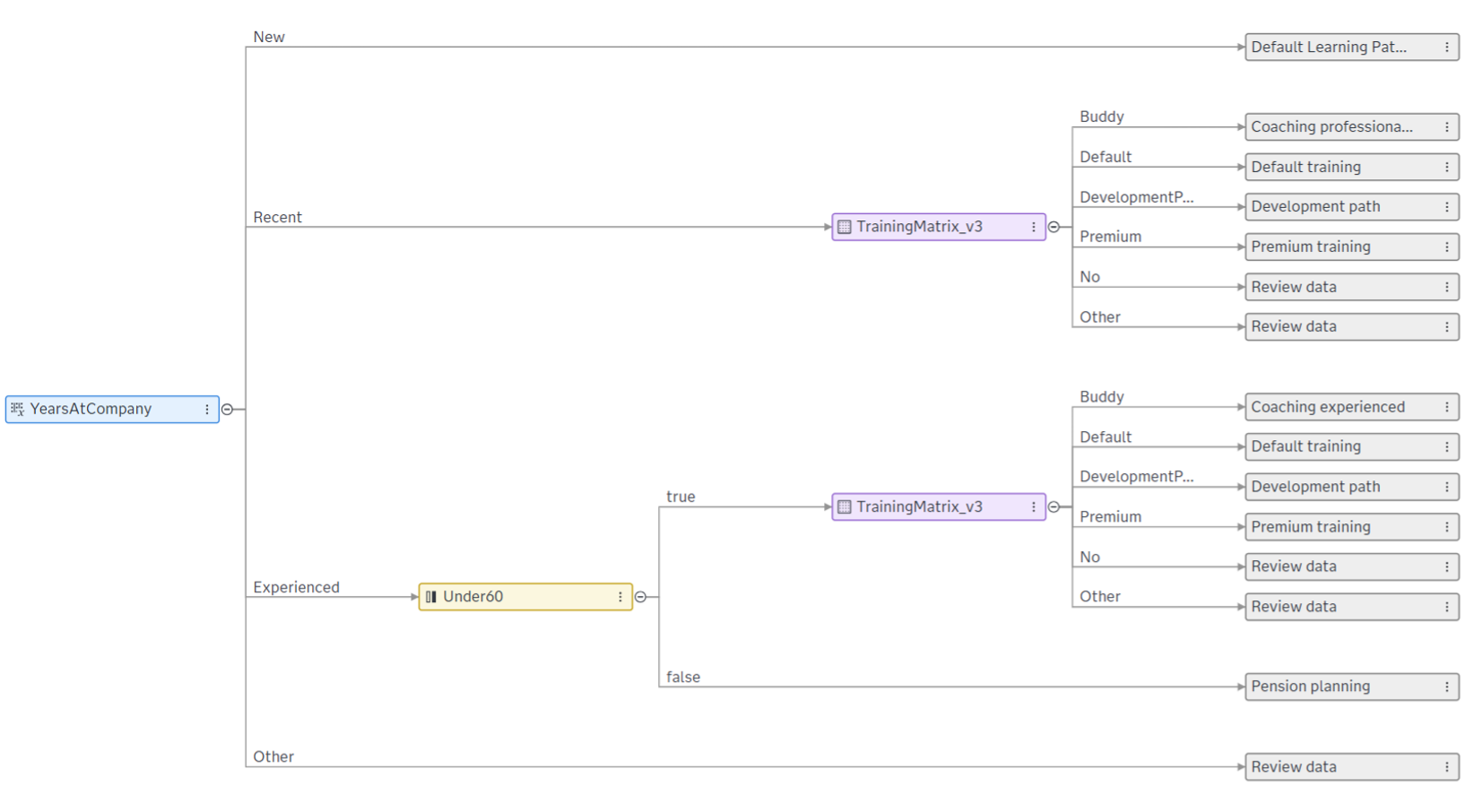
Before calling LLMs to select a development path or training I want to implement HR policies to steer the output based on employees’ experience (Years at the Company), performance rating and attrition risk. For this I leverage the Segmentation Tree node in SAS Intelligent Decisioning to get a deterministic outcome telling whether a development pathway should be considered and whether the premium training advisor is allowed. This one is more expensive. We don’t want this to be probabilistic in nature. The HR policy gives guidelines to the Agent.
The Segmentation Tree returns one of the options Coaching, Default training, Premium training or Development path according to HR policies. In some cases, the recommendation will be to review the data first, for example when data is missing.
The TrainingMatrix in this node is used to set these options on a granular level depending on attrition risk and performance rating:
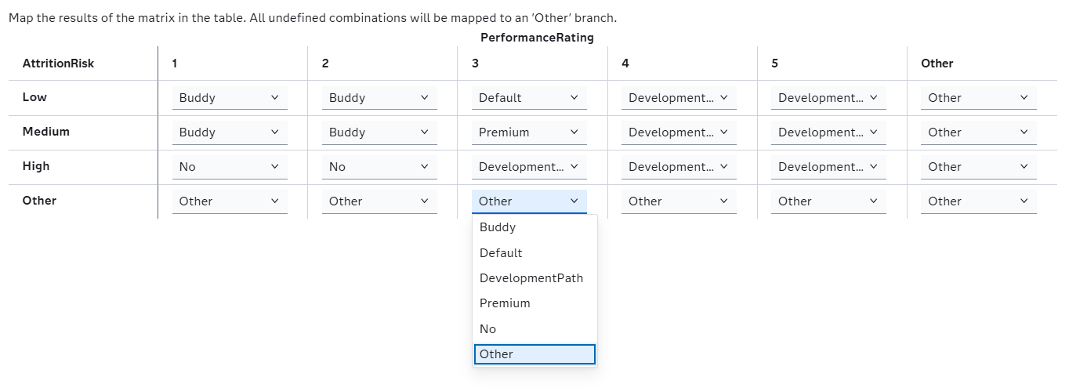
Important note: this implementation is purely fictional and not based on any official HR policy. This example shows the flexibility to implement deterministic HR rules in agentic workflows and be able to change them easily in changing conditions.
Step 3. Designing prompt models in the Agentic AI Accelerator Framework
The Agentic AI Accelerator Framework comes with a nice prompt builder UI to test and select optimal prompt for the use case at hand. The results will be registered into SAS Model Manager as prompt model. These models will be part of the agentic workflow like the predictive models. The prompt model gives the proper system prompt and user prompt for the LLM.
In the UI we start by selecting the SAS Model Manager project and give the prompt a name. Next, we select the LLM we want to test and set the properties. Finally, we try out several system prompts and user prompts to see which one produces the best results.
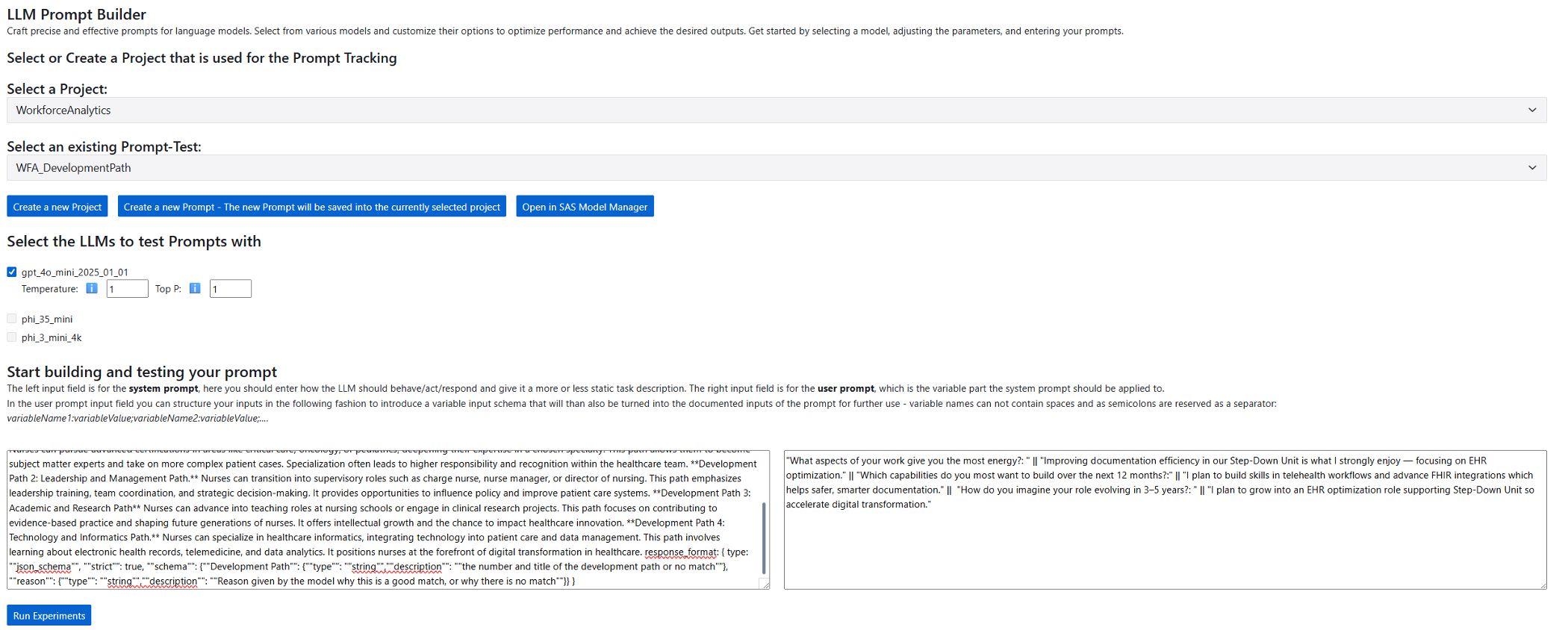
I begin with the prompt to let the LLM select a development path for the employee based on its data. In the system prompt I ask the LLM to give the output, including a reason for this match, in a specific json format, so I can easily retrieve the output from this json in my agentic workflow. In the user prompt I provide the 3 answers the employee gave in the employee survey. We expect the LLM to match this survey data to the potential development path options it has available. In this version I provide the LLM with these options through the prompt. In the next version I will use Retrieval Augmented Generation to make this process even more flexible and scalable.
I run several experiments and if I’m satisfied, I can select the best one as Best Response. I select “Manifest Best Prompt” which registers the prompt as model in SAS Model Manager.
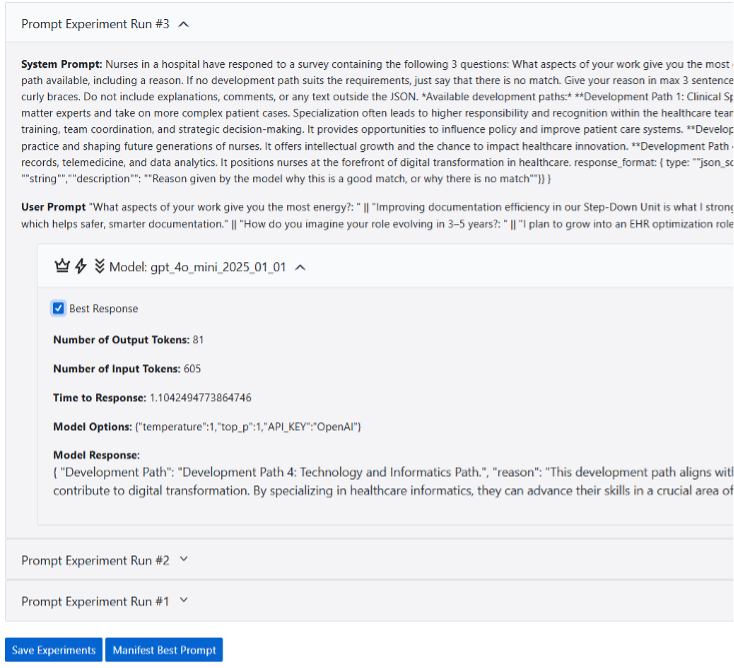
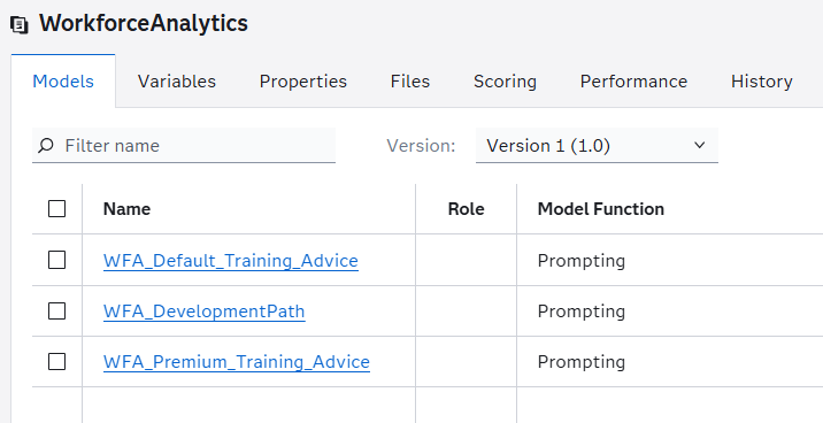
Now we have the assets to build an agentic flow for selecting a development path. Next, I need to do the same to select the best training from a set of training options. In fact, I develop two versions, a default and a premium option. The premium one is more expensive and will only be used according to the HR policy guidelines implemented in step 2. Like the Development Path prompt, I register both Default Training Advice prompt and Premium Training Advice prompt as prompt models in SAS Model Manager. Now, we have 3 prompt models available, all governed in SAS Model Manager and ready for deployment in an agentic workflow.
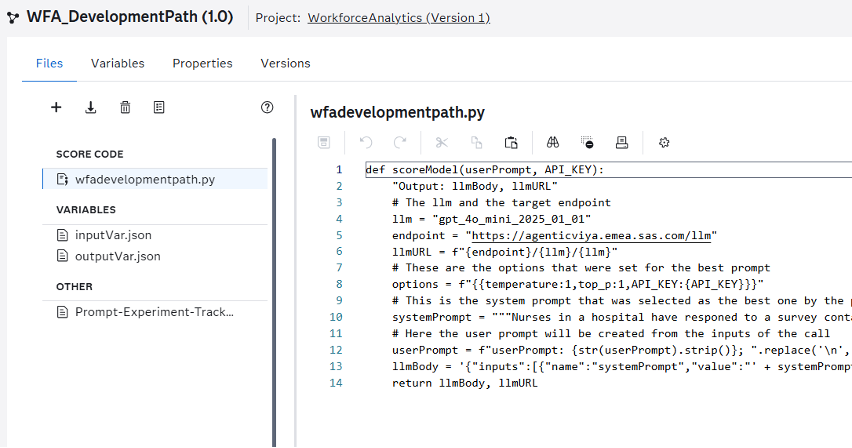
Each prompt model uses python score code. We can see the details when opening the prompt models in SAS Model Manager.
Step 4. Implement a Development Path Agent
Next step is to develop the Agentic workflows for the development and training agents. For this we use the prompt models created in the previous step to deliver the inputs to the LLM. The Development Path agent needs a user prompt that contains the actual answers to the survey questions for each individual employee. We implement this in a business rule set in which we assign a concatenated string to the user prompt variable. The string concatenates the 3 survey questions and answers as we have tested in the prompt builder UI of the Agentic AI Accelerator Framework.
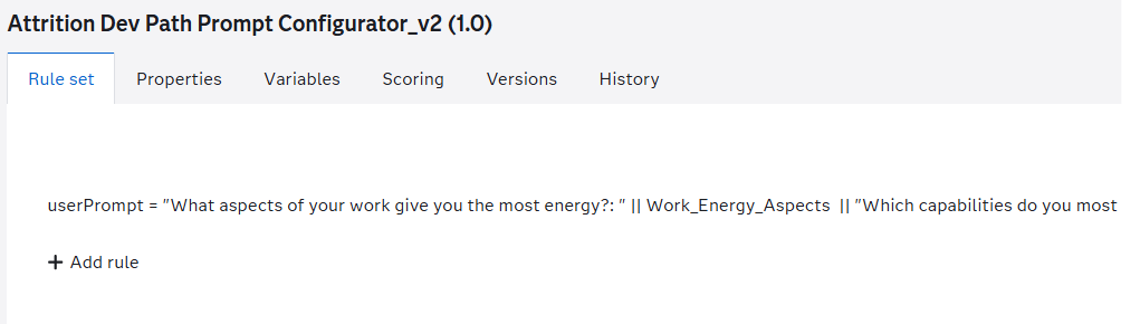
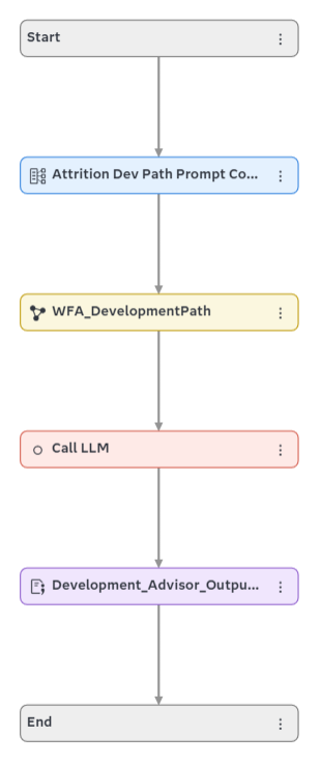
This user prompt will be provided to the prompt model called WFA_DevelopmentPath which creates the final inputs for the Call LLM node: the user prompt, system prompt and some LLM settings.
Now we can call the LLM. We use the Call LLM node from the Agentic AI Accelerator Framework to call the LLM that was selected in the prompt model. After running the node, we will receive potential development path as output in json format. That’s why we use a final piece of code to extract this development path from the json.
Step 5. Implement the final Training Advisor Agent
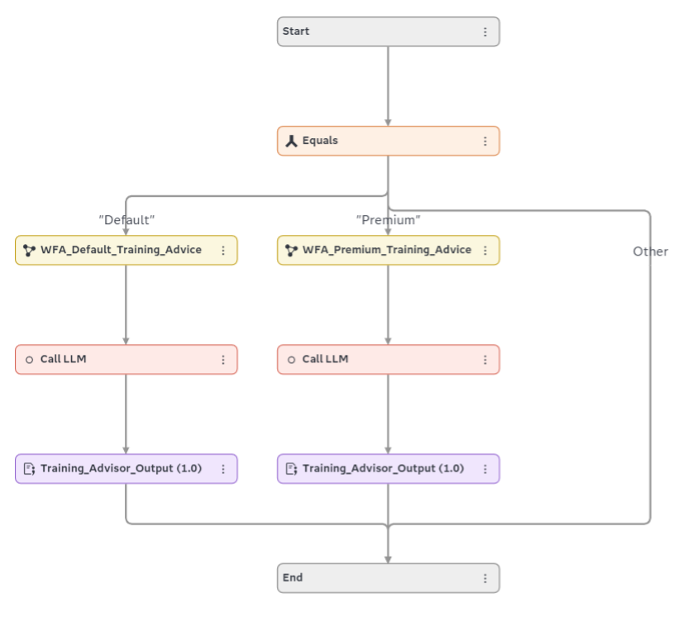
Like the Development Path workflow, we need to develop a workflow to let an LLM select the best training option. I use the Default or Premium prompt depending on our HR Policies in the segmentation tree described in step 2. Note that I don’t implement a business rules set to create the user prompt like in the previous step. In this case we provide the user prompt as input variable to the workflow, because it comes directly from the survey data.
Step 6. Bring it all together in an Agentic Workflow
Now we have the prediction models, the agentic sub-workflows and the HR policies available we can bring it all together in a full “Agentic AI for Workforce Analytics” agentic decision flow. In SAS Intelligent Decisioning we combine data, models, rules and LLMs to orchestrate multi-step, governed agentic workflows. I like this because it is flexible and leverages the power of both deterministic as well as probabilistic approaches. Decisions are traceable, explainable and governed as re-usable assets. Here is the picture, let’s go through it step by step.
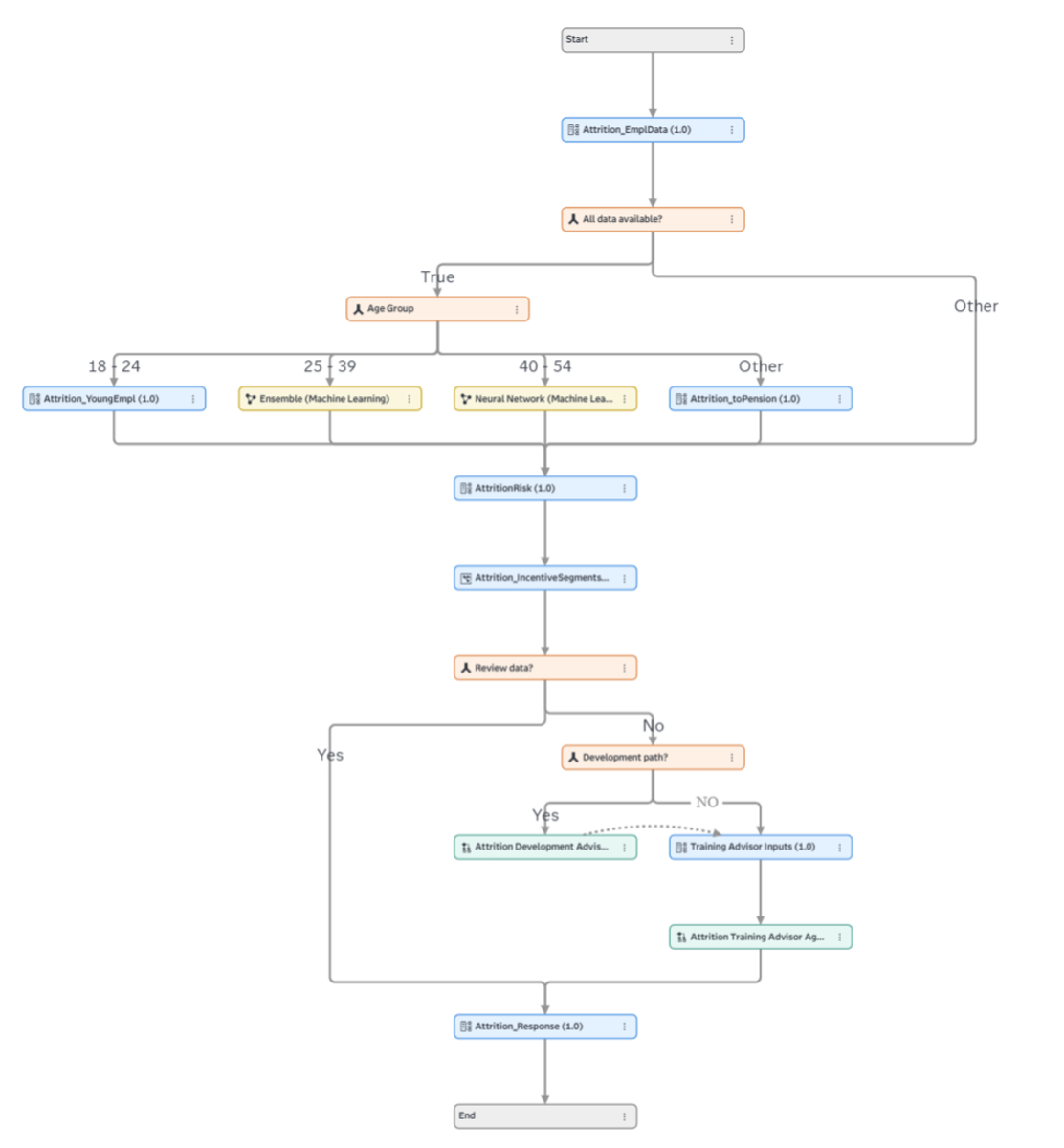
In this agentic decision flow, we first check if all data we need is available in the inputs. If yes, we use the Machine Learning models we developed in step 1 to predict Attrition for employees between 25 and 55. We saw that the ensemble model was slightly better for employees between 25 and 40. For younger and older employees we implement business rules to calculate the attrition probability. This is because the models did not perform well for these groups; it is safer to use fixed rules.
Next, the calculated attrition predicted probability is used to set the attrition risk to High, Medium or Low following deterministic but flexible rules. After this node we added the Segmentation Tree to decide on the right support according to HR policies designed in step 2. Note that in some cases the advice was to check the data first (Review Data = Yes).
Finaly, we call the Development sub-flow for cases where a development path was requested. If not, we just ask the Training Advisor Agent to select proper training. Note that this is also the case for the employees with a Development Path selected (cross-connection).
At the end we use the output of the models and agents to deliver a nice training recommendation with reason as response as output.
In between each step of building the flow I test the flow regularly using the Scoring tab. When satisfied, the flow is ready to be used. Let’s save and start operationalizing it.
Step 7. Operationalize the workflow and get advice
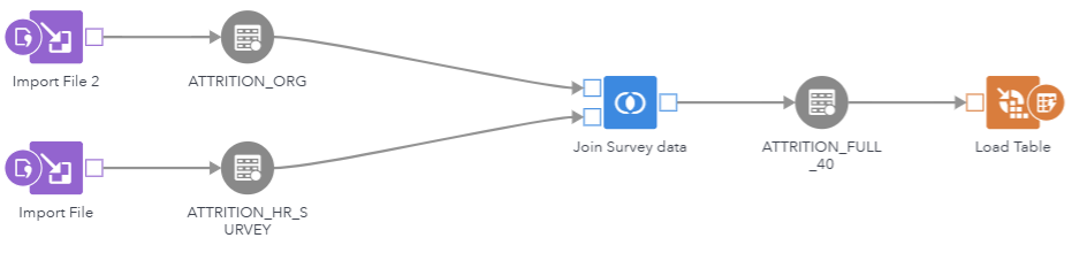
As explained in the beginning of this blogpost, we want to show the results of the agentic flow in a SAS Visual Analytics dashboard. I selected 40 employees to fill in the survey and use SAS Studio to join this data to the original Attrition data set in a data flow.
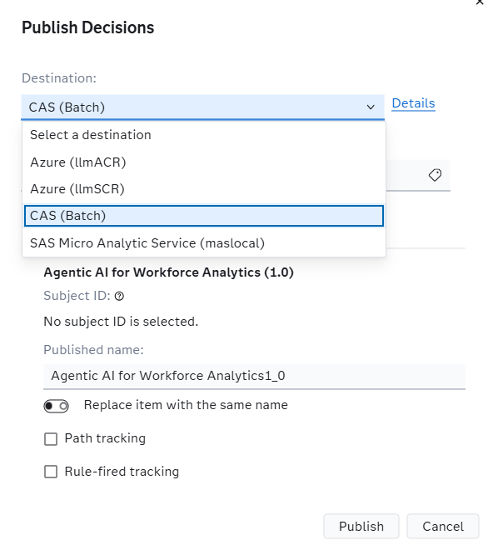
To execute the agentic workflow on this data, I first publish the workflow to the CAS destination in SAS Viya. For this, select the publish button in SAS Intelligent Decisioning and select a CAS destination.
Now I have the workflow as decision flow available for execution in CAS. Next, I use the out-of-the-box step “Execute Decision” in another SAS Studio data flow, I select the right decision in the node and use the input dataset of 40 cases as input data. I join the output table to the full table which is being used in the SAS Visual Analytics dashboard.

Now we can see the results of the selected employees on the Dashboard grouped by Attrition risk.
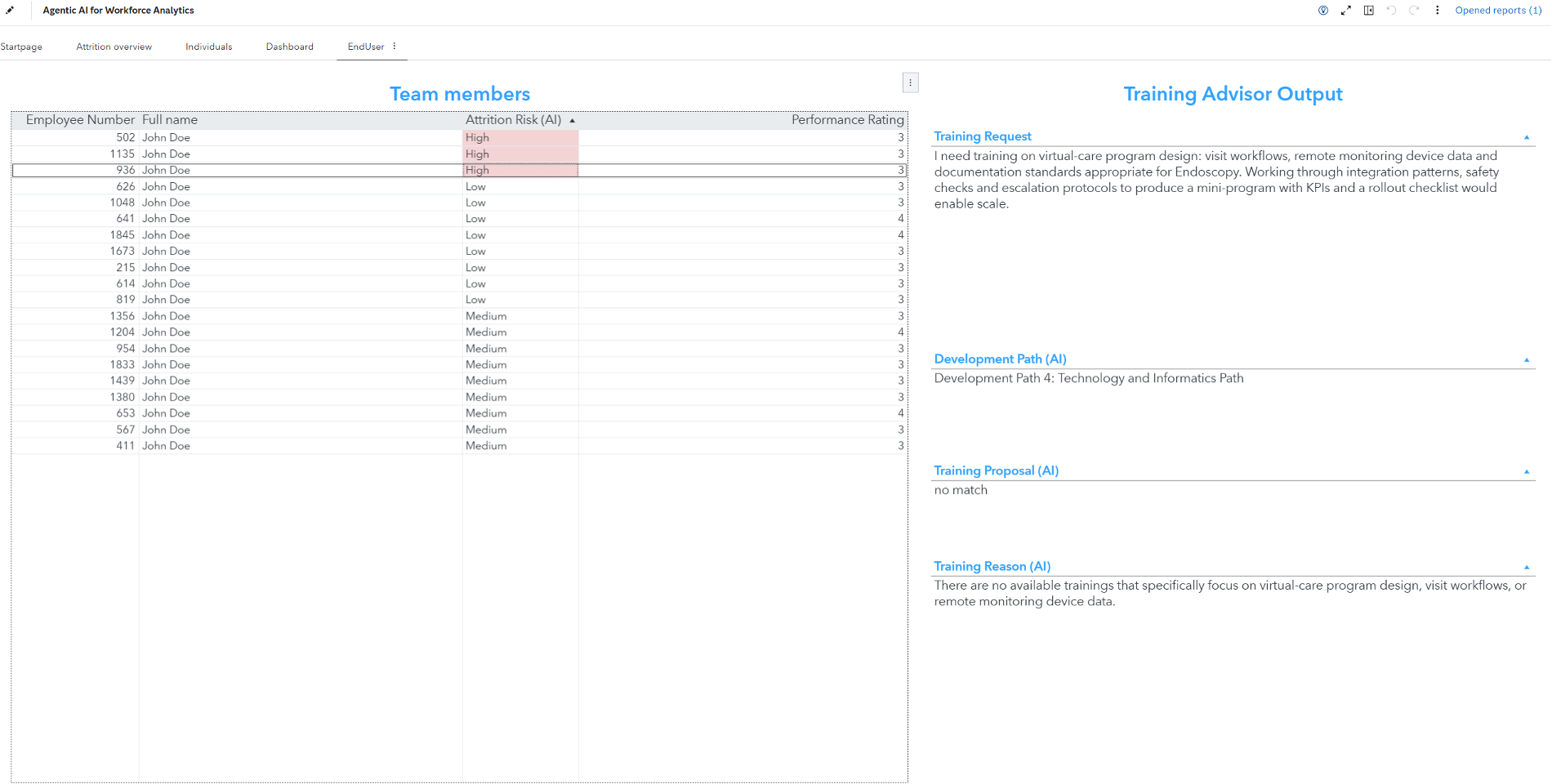
As alternative we could also publish this agentic decision flow directly as SAS Micro Analytic Service in SAS Viya. Then we can call the automatically created API in real-time and get instant response from each single request. Another option is to publish it as a (Docker) Scoring Container Runtime. Then we can use it on other Kubernetes environments like Azure. Both could support real-time deployments like a chat interface.
Conclusion
This blog examined agentic AI through the Agentic AI Accelerator Framework alongside standard SAS Viya features. Within SAS Intelligent Decisioning, we integrated data, models, rules, and large language models (LLMs) to create a multi-step, governed agentic workflow. The combination of deterministic models and rules applied to structured data, together with probabilistic analysis of unstructured data, offers a robust approach for achieving improved, safe, and well-governed Agentic AI solutions.
We used our “Agentic AI for Workforce Analytics” workflow on simulated employee data to deliver tailored training recommendations that align with each employee’s information and growth objectives. This approach could encourage employees to remain at their jobs longer, lowering the risk of attrition.
To explore how this approach can be implemented in practice, learn more about SAS Agentic AI Accelerator and discover how to build, govern, and scale AI agents in enterprise environments.